Ride / Run / Row
Find your rhythm.
Connect your bike, treadmill or rower. See every effort. Keep your workouts on your iPhone and take them with you as FIT files.
 iPhone · iOS 17 or later
Connect / move / keep
Your setup, your data, in three steps.
No required account, no virtual world to log into. Rydos talks to your equipment directly over Bluetooth.
-
Connect
Choose Ride, Run or Row, then connect your equipment over Bluetooth. Assign power, cadence or stroke rate, speed, heart rate and machine independently. One device can fill several roles, and saved connections reconnect when your equipment wakes up.
Power Cadence Speed Heart rate Machine -
Move
Watts for your ride, pace for your run, split and stroke rate for your row. See the readings your equipment provides, with their source and freshness clearly shown.
Sport-specific metrics Per-sensor freshness -
Keep
Start, pause, resume and finish on your terms. Every activity is saved locally with its recorded data, and an interrupted recording can be recovered.
Local history Recoverable
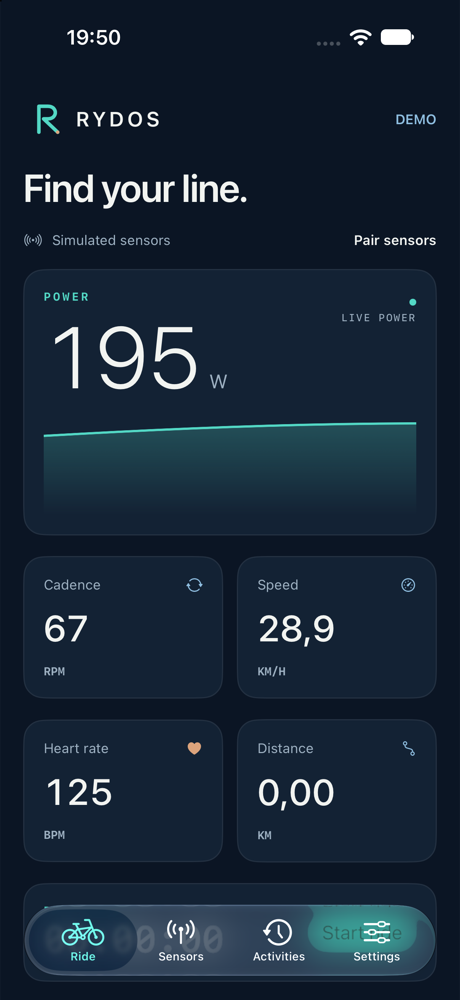
Live workout view
Every number, with its source.
Each sport gets the numbers that matter: cycling power and cadence, running pace per kilometre, or rowing split per 500 metres and strokes per minute. Heart rate, distance and time stay close at hand.
- Independent sensor roles Power, cadence or stroke rate, speed, heart rate and machine are chosen separately, so a missing sensor doesn't hide the rest of your data.
- Freshness, not guesswork Each reading reflects when it last arrived, so a stalled sensor is visible before you rely on it.
- See your rhythm A live trace shows recent power for cycling or speed for running and rowing, helping you see how your effort changes through the session.
Control your effort
Set your effort. Find a steady rhythm.
Controls follow your sport and your equipment's capabilities. Rydos only offers a target when the connected machine reports support and a usable range.
Controls for your machine
Ride and Row offer resistance or target power; Run offers belt speed and incline, where supported over FTMS. Confirm each change before it is sent. Use the treadmill's own controls to start and stop its belt.
Heart-rate target control
An optional, experimental mode that adjusts resistance for cycling and rowing, or incline for running, toward a heart-rate target. Running speed stays manual. Changes are gradual, giving your heart rate time to respond.
Automation stops when heart-rate or movement data goes stale, when you stop moving, if a command fails, or if the activity is paused. The machine keeps its last target. This mode does not promise medically safe target selection or precise heart-rate tracking.
Generated world
A world your phone builds, not one it downloads.
Ride a road, run a trail or row across the water in an optional 3D world. Routes and scenery are generated offline on your phone from a seed.
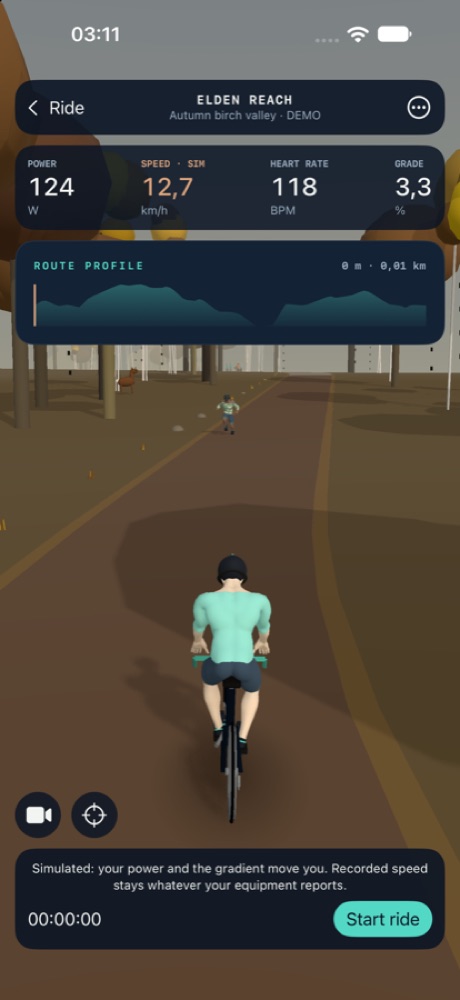
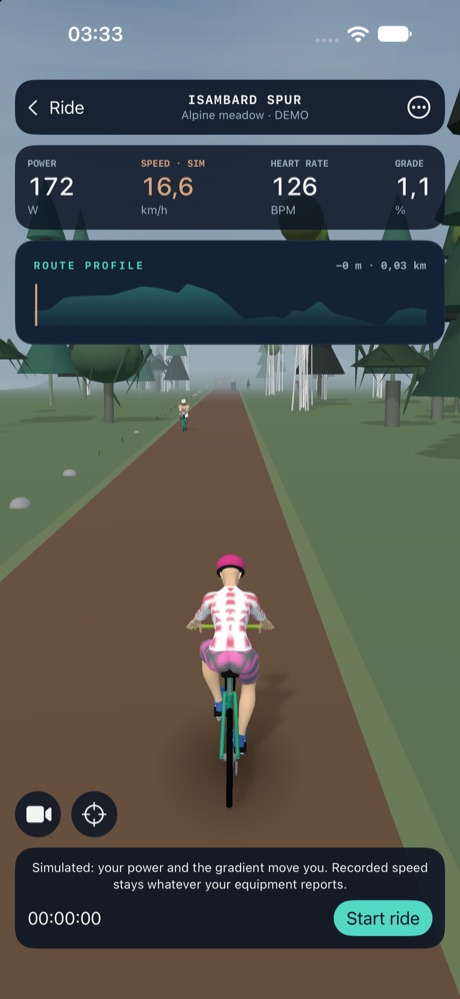
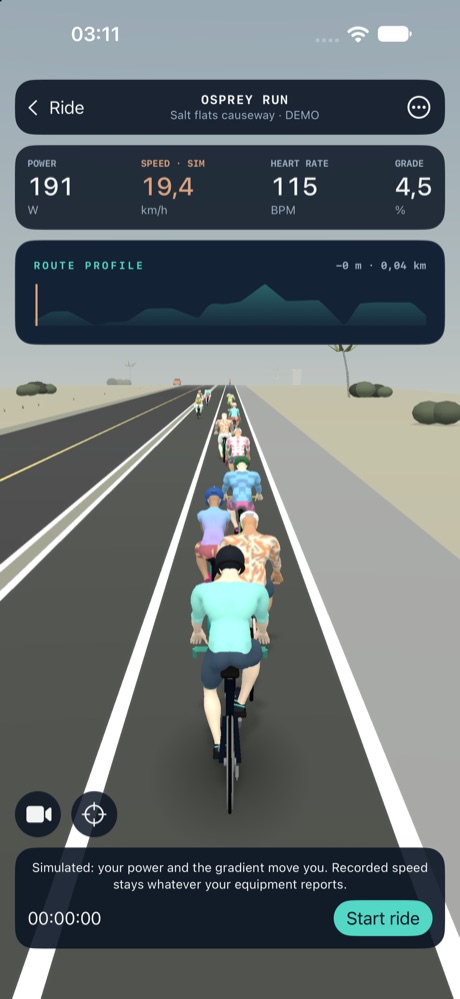
- Routes, generated on the phone Every route is built offline from a seed, so the same seed gives you the same route again. Twelve kinds of segment — straights, sweeping bends, switchbacks, climbs, descents, rolling hills, plateaus, chicanes, causeways, gorges and forest sections — carry real gradients and join into a seamless loop.
- Sixteen biomes, ten surfaces Road, trail, mountain and lake settings each have their own palette, fog, sun angle, tree species and landmarks. Ten surfaces from asphalt to sand change how the ground looks and how much rolling resistance the simulation applies.
- Built, not downloaded Twelve tree species and twenty landmark kinds are generated procedurally on the device — none of it is downloaded artwork or a real-world location.
- Decorative traffic Cyclists, runners, walkers, cars, buses, tractors and boats move through the scene for atmosphere. The scene brings company and movement to your workout.
- Camera Eight framings to choose from. Drag to look around, pinch to zoom, double-tap to recentre.
- Your kit, for every sport Pick a bike in the Garage, a running outfit in the Locker, or a boat and oars in the Boathouse. Each sport remembers your choices, and your recorded sensor data stays yours.
The world moves with your effort. Your activity history and exports keep the readings from your equipment, so your workout data stays independent of the scenery.
The world is optional: it only renders while its view is open. Turning on Reduce Motion keeps the scene still.
Your activity, portable
Local history. A real file. Your choice where it goes.
Activities live on your iPhone first. Nothing is required to leave the device, and nothing leaves it automatically to a cloud account.
Local history
Activities, the original Bluetooth data and connection events are stored in a local database on your phone — no account, no sync.
FIT file
A FIT file can be created automatically after saving, or exported manually any time from an activity's history entry.
A destination you choose
Share the FIT file through iOS's share sheet, or import it manually into Garmin Connect on the web. Rydos does not upload finished activities to Garmin automatically, and a normal Garmin account does not grant that integration — there is no Garmin partnership, and iOS sharing may not list Garmin Connect as a destination on every device. Apple Health export is also available as an optional, permissioned step, separate from FIT.
Compatibility
Bring the equipment you already own.
Connect compatible bikes, treadmills, rowers and sensors using standard Bluetooth LE fitness profiles. The readings and controls available depend on what your equipment shares.
Swipe or scroll sideways to see all compatibility details.
| Bluetooth profile | Use it for | Available readings |
|---|---|---|
| FTMS Indoor Bike Data | Cycling | Speed, cadence, power and distance |
| FTMS Treadmill Data | Running | Speed, distance and incline |
| FTMS Rower Data | Rowing | Stroke rate, split, power and distance |
| Cycling Power | Cycling | Power and supported revolution data |
| Cycling Speed and Cadence | Cycling | Wheel speed and crank cadence |
| Running Speed and Cadence | Running | Speed and step cadence |
| Heart Rate | Every sport | Heart rate |
| ANT+ and proprietary profiles | Not supported | Use a supported Bluetooth profile instead |
Check your equipment's Bluetooth specifications or get help with your setup.
FAQ
Questions worth answering plainly.
Do I need an account?
No. The current app records locally without sign-in.
Where is my data stored?
Recordings stay on your iPhone. You choose whether to export a FIT file, enable Apple Health sharing, or send a support report.
Will it work with my bike, treadmill or rower?
Rydos supports standard Bluetooth fitness profiles for all three sports. Check the table above for the profiles and readings your equipment needs to share.
Can I control my equipment?
Where your machine supports it, set resistance or target power for cycling and rowing, or speed and incline for running. Start and stop a treadmill belt with its own controls. Optional heart-rate control adjusts resistance or incline gradually; running speed stays manual.
Why does heart-rate control wait before changing anything?
On purpose: a two-minute warm-up, a 15-second rolling average of your heart rate, and at least 30 seconds between steps (configurable down to 10). It also needs fresh movement and heart-rate readings and an acknowledged starting resistance or incline. If data goes missing, you stop moving, a command fails, or you pause the activity, automation stops and the machine holds its last target.
Can I export to Garmin?
You can export a FIT file and import it through Garmin Connect on the web. Automatic upload to Garmin isn't available yet.
Where can I get Rydos?
Get Rydos on the App Store for iPhone with iOS 17 or later.